
Chiranjeevi Maddala
April 2, 2026
Most schools that claim to use AI are actually managing 10 different apps, 10 different logins, and 10 different data policies that nobody has read. Zion is the alternative. One platform, four purpose-built hubs, 30+ tools, and a single safety architecture that IT coordinators can actually govern.
Jayesh Agrawal, PGT Physics Teacher at Brighton International School, Raipur, described his situation before Zion: "I had students using five different tools for a single project. By the time they pulled everything together, half the class had lost track of what they were doing. Now everything is in one place, and I can see what each student is actually building."
His experience is the standard state of AI adoption in Indian schools today. The tools have arrived. The governance has not. Schools across India are managing 8 to 15 separate AI subscriptions, none of which share data, none of which connect to learning outcomes, and most of which the IT team did not procure and cannot monitor. Every tool has its own data policy, its own login, and its own activity log that the school cannot access. Student data flows to multiple external servers under terms the school has never reviewed.
This is not AI adoption. It is AI fragmentation. The students caught in the middle bear the burden of switching between platforms, losing context, and using AI tools that were never intended for them.
Before we tour Zion, it is worth being precise about what tool fragmentation actually costs a school, because the conversation usually stops at "it's inconvenient" when the actual costs go much deeper.
Every separate AI tool a student uses is a separate data liability. When a student opens a consumer AI image generator on a school device, their session data, their prompts, and any personally identifying information in those prompts flow to a server the school does not control, under a data policy the student cannot understand and the school did not negotiate. Multiply this by 10 tools across 800 students and you have a data governance situation that no IT coordinator can manage and no principal can honestly say they are comfortable with.
The second cost is invisible to most administrators but devastating to learning outcomes. When tools do not talk to each other, the signals students generate while using AI disappear. A student spent 40 minutes researching climate change on one platform and then created a presentation on another, leaving no trace in any system the school can see. The teacher has no idea what happened. The learning is real but undocumented, unmeasured, and disconnected from anything the school can act on. AI Ready School built Zion specifically to solve this problem. Every tool on the platform captures signals. Every signal feeds into the student's learning profile. Nothing disappears.
A school with 15 AI tools and no governance is not ahead of a school with one governed platform. It is behind one.
Zion is AI Ready School's integrated AI tool suite for K-12 students and teachers. It brings 30+ purpose-built tools together under one platform, one login, one data policy, one safety architecture, and one activity signal that feeds directly into the rest of the AI Ready School ecosystem. The platform is organised into four hubs, each designed for a distinct mode of student engagement with AI: the Learning Hub, the Creative Hub, the Research Hub, and the Project Hub.
What makes Zion different from a collection of tools bundled under one login is the integration. Every interaction a student has across any hub generates a signal. That signal feeds into their Cypher 360-degree learner profile and appears in their teacher's Morpheus monitoring dashboard in real time. Nothing is siloed. Every tool the student uses contributes to a unified, growing picture of what they are doing and learning. The teacher who assigned the project, the parent who wants to understand their child's engagement, and the school management tracking learning outcomes across the institution all see the same connected picture.
Zion is not a product. It is an operating system for how students interact with AI inside a school.
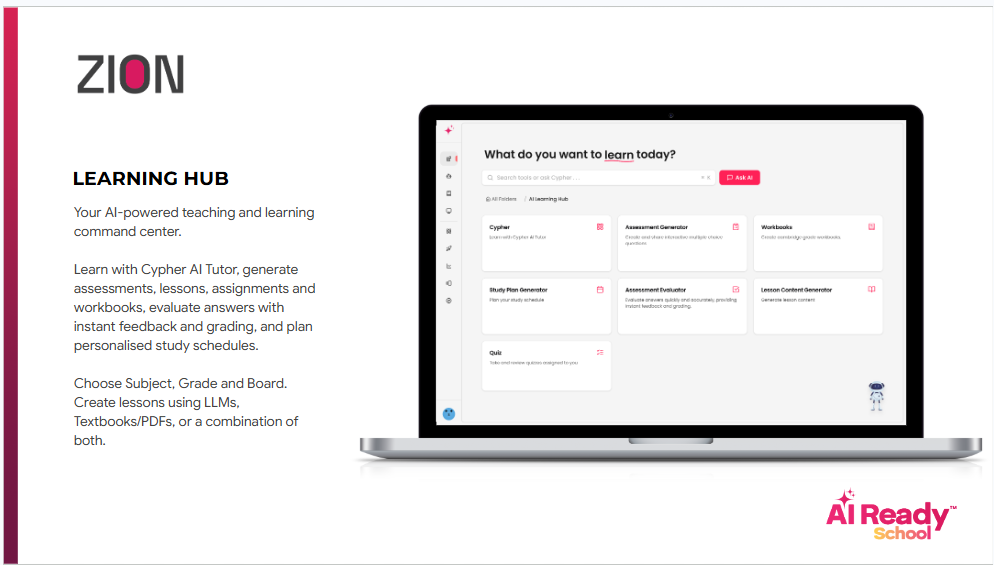
The Learning Hub is where students interact with AI in direct support of their curriculum. Six tools cover the full academic cycle. The AI Buddy answers questions, creates content, and supports learning 24 hours a day. The Assessment Generator creates instant quizzes in multiple formats with auto-evaluation and analytics. The Lesson Content Generator produces notes, case studies, and depth-of-knowledge questions from any topic or textbook chapter. The evaluator scores uploaded answer sheets using rubric-based AI checking. The study planner builds personalised exam preparation schedules based on the students' knowledge gaps. The Assignment Generator creates differentiated tasks aligned to specific learning objectives, with automatic evaluation built in.
Every tool in the Learning Hub is aligned to CBSE, ICSE, and major state board frameworks. When a student uses the Assessment Generator for a Class 9 CBSE Science quiz, it does not produce a generic science quiz. It produces questions calibrated to the NCERT textbook chapter, at the Bloom's Taxonomy levels appropriate to that grade, in the format that CBSE board examinations use. This curriculum specificity sets a purpose-built school platform apart from a general AI tool that schools may use.
Cypher's connection sets it apart from any standalone AI tool. Every Learning Hub session feeds into the student's Cypher 360-degree profile. The topics they ask about, the concepts they misunderstand wrong, and the questions they return to voluntarily all become data that Cypher uses to calibrate its questioning strategy in the next learning session. The Learning Hub is not a separate activity from Cypher's personalised learning. It is the same learning loop expressed in a different mode.
The Learning Hub turns AI from an answering machine into a practice partner. Every session leaves a signal. Every signal improves the next session.
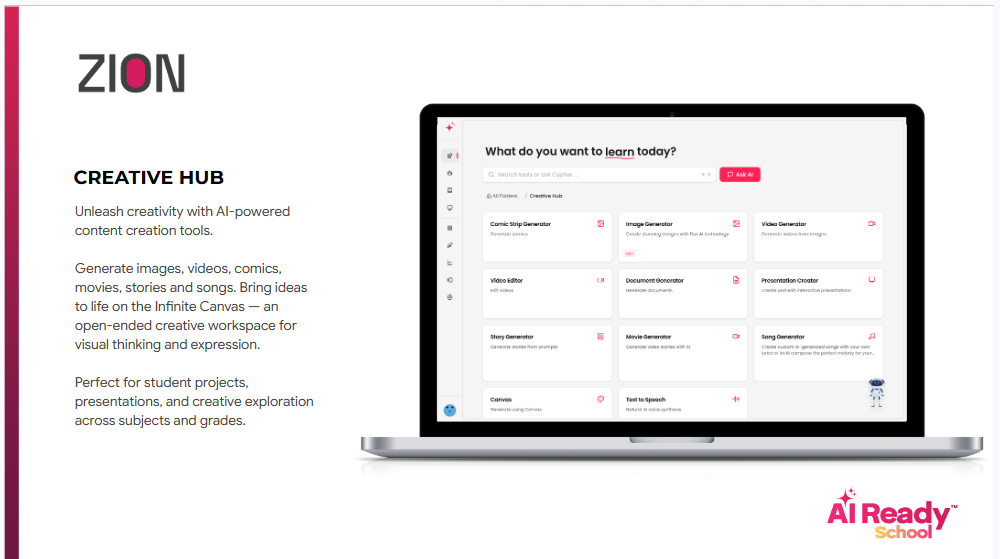
The Creative Hub is built around a principle that sits at the heart of AI Ready School's philosophy: every student's imagination exceeds their current technical skill. The 12 tools in this hub are designed to close that gap, not by doing the creative work for students but by removing the technical barriers that stood between what they imagined and what they could actually make.
Students can generate images, create comic strips, produce short video clips and full AI-generated movies, build presentations, write stories with illustrations, compose voiceovers, and use the Infinite Canvas as a limitless digital whiteboard for brainstorming and collaborative visual thinking. Zara, an 11-year-old student in AI Ready School's use case library, thinks in films. Her analytical understanding of history never appeared in her written work. Using the Movie Generator and Voiceover Generator in the Creative Hub, Zara produced a project on the Indian independence movement that her history teacher described as the most sophisticated analysis she had seen from a student in three years. The Creative Hub did not change what Zara knew. It changed what she could show.
For IT coordinators, the content filtering architecture is the most important thing to understand. Every image generation request is filtered before generation occurs, not after. Students never see content that was produced and then blocked. They encounter a boundary before the content exists. Teacher access controls allow any tool in the Creative Hub to be enabled or Access can be restricted by grade, class, or individual student from a single administrative console, and changes take effect immediately without IT intervention.
The Creative Hub does not teach students to use AI tools. It teaches students that their imagination is more powerful than any technical barrier.
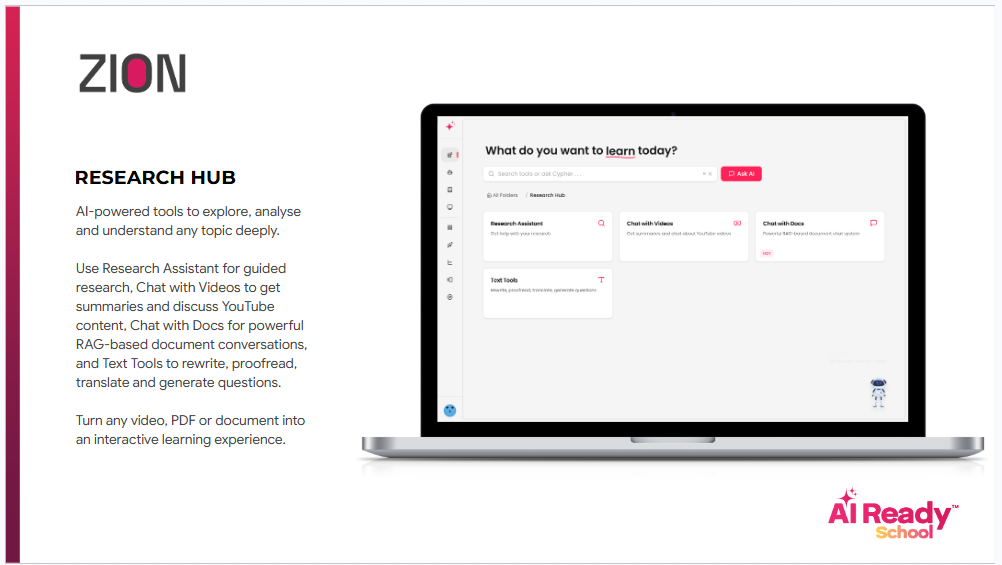
The Research Hub is where students learn to think like researchers rather than consumers of information. In a world where any question can be answered in seconds, the skill that matters is not finding information. It is about knowing what to do with it. The four tools in this hub develop exactly that: the capacity to explore a topic with genuine depth, evaluate sources critically, interact with complex documents, and synthesise findings into original understanding.
Research Buddy is the centrepiece of this hub. It is an AI research assistant that guides students through framing a research question, identifying sources, evaluating evidence, and building a structured argument. It does not write the report for the student. It teaches the methodology. Chat with Videos makes any YouTube content interactive with summaries, questions, and concept explanations so students engage analytically rather than passively with video material. Chat with PDFs lets students upload any document and interact with it through AI-powered conversation, which is particularly valuable in the NEO AI Innovation Lab where students work with academic papers. Text Playground builds writing literacy by summarising, expanding, translating, and rewriting text with the original always visible alongside the transformation, so students understand what changed and why.
The Research Hub's signal capture is particularly valuable for innovation heads. When a student spends 40 minutes in Research Buddy exploring the ethics of AI in healthcare, that curiosity is documented in their Cypher learner profile. It is no longer an invisible activity that happened at home with no trace in any school system. It is a recorded part of their learning journey that teachers can see, respond to, and build on.
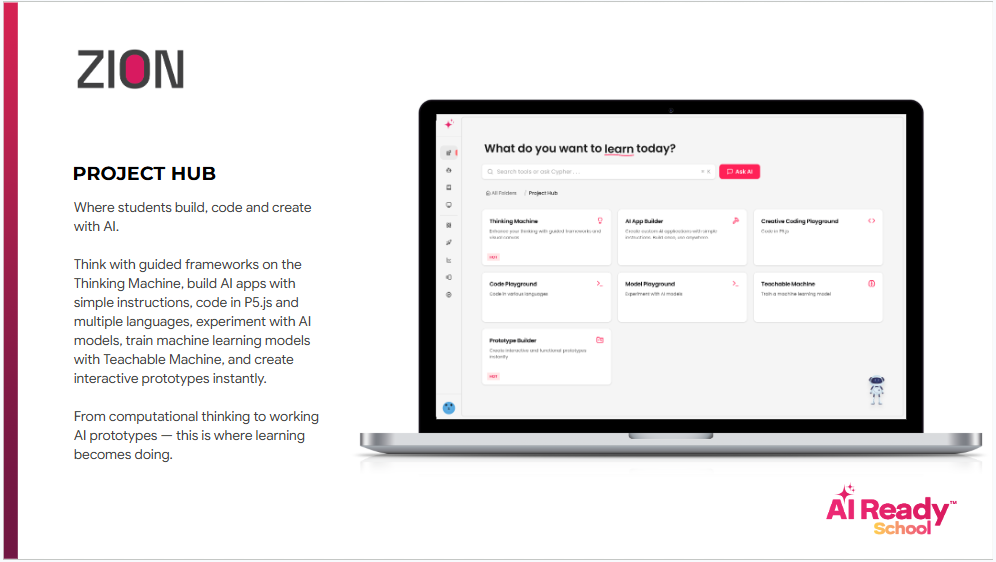
The Project Hub is where students build real things. Not school projects in the traditional sense of a poster or a report. Working applications, trained AI models, coded prototypes, and structured innovations that become portfolio entries. Six tools cover the complete build cycle: the AI Coding Playground for multi-language coding with AI assistance that explains rather than replaces student thinking; Teachable Machine for training image recognition models using the student's own data, App Builder for no-code AI application development, AI Model Playground for comparing how different AI models respond to the same prompt, Project Builder for structured prototype development from idea to working product and Thinking Playground for Design Thinking, Computational Thinking, and AI Thinking frameworks.
Shaurya Agrawal, a Grade 8 student at Brahmvid The Global School in Raipur, built a plant identification app using the Teachable Machine and App Builder. He said, "I thought AI was just for getting answers. After using the Project Hub for three months, I understand how AI actually functions. That is completely different from just using it." That shift, from user to builder, from consumer to creator, is the AI literacy outcome the Project Hub is designed to produce in every student who engages with it.
The Project Hub is the primary interface between Zion and the NEO AI Innovation Lab. Every portfolio students build through the Project Builder feeds into their permanent AI Ready School record, complete with timestamps, teacher annotations, and skill-level assessments. When students participate in the AI Startup Show Juniors, their Project Hub portfolio is their primary submission credential.
The Project Hub answers the most important question in AI education: not what can AI do for you, but what can you build with AI that could not exist without you.
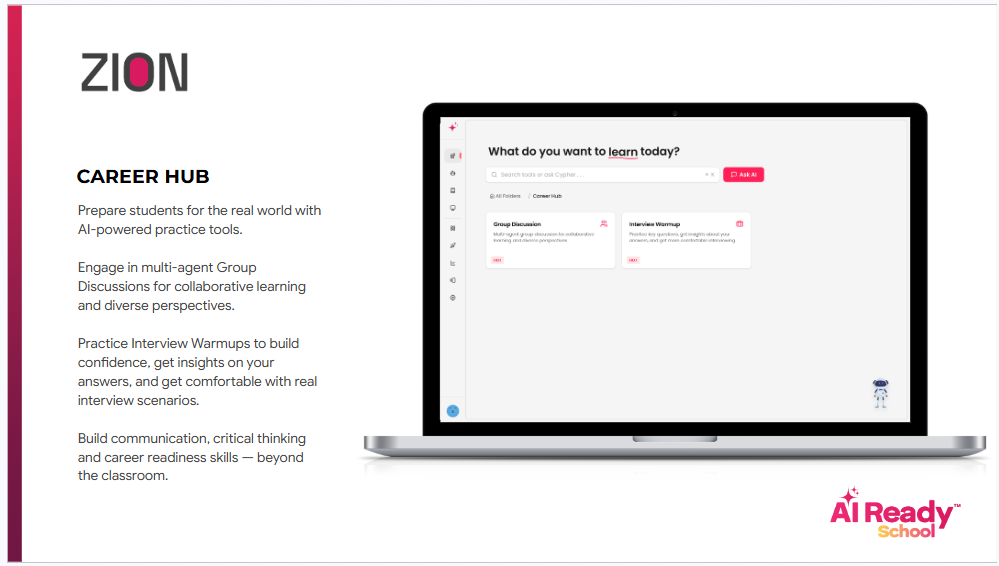
The Career Hub is where student potential meets the future economy. It is not a static list of job titles but a dynamic engine for self-discovery and strategic planning. While traditional schools focus on what a student wants to "be", the Career Hub focuses on what a student is capable of becoming in an AI-augmented landscape. Five specialised tools guide this journey: the Career Path Explorer for mapping interests to emerging 21st-century roles; Skill Gap Analyser for identifying the specific technical and "human-only" skills needed for a chosen path; Portfolio Architect for curating Project Hub successes into a professional digital showcase; Aptitude 360 for tracking evolving strengths through data-driven insights; and the Future-Ready Roadmap for setting long-term milestones that bridge the gap between classroom learning and industry reality.
Ananya Reddy, a Grade 10 student, used the Career Hub to transition her interest in digital art into a specialised focus on AI-assisted UX design. She said, "I used to worry that AI would take over creative jobs. The Career Hub showed me how my specific eye for design, combined with AI literacy, actually makes me more valuable. It didn't just give me a career idea; it gave me a strategy to stay relevant." That transition—from career anxiety to career agency, from seeking a job to architecting a future—is the fundamental shift the Career Hub is designed to facilitate in every student.
The Career Hub serves as the final integration point within the Zion ecosystem, turning the raw data of the Learning Hub and the tangible outputs of the Project Hub into a verified professional identity. Every skill mastered and every prototype built is automatically tagged and categorized within the student’s Aptitude 360 profile, which feeds directly into their permanent AI Ready School record. When students prepare for the AI Startup Show Juniors or transition to higher education, the Career Hub generates a comprehensive "Future-Readiness Transcript" that proves their competency far more effectively than a traditional grade ever could.
The Career Hub answers the ultimate question for the next generation: not just how will you work with AI, but how will you lead in a world where AI is the baseline?
Zion's safety architecture was designed from day one for a K-12 environment, not retrofitted from an adult consumer product. This distinction matters in ways that go beyond compliance. ChatGPT was designed for adult professional use. Its content policies are calibrated for adults. Its data handling practices assume adult users with legal capacity to consent. When students use it, they are using a product that was not built for them, with safety guardrails that were not designed with their specific vulnerabilities in mind.
Every content filter in Zion operates at the generation layer. Inappropriate content is blocked before it is produced. The conversational limits in the AI Buddy are built into the system prompt architecture, not applied as post-generation filters that a determined student can circumvent through careful prompting. Teacher-managed access controls give IT coordinators and teachers the ability to enable or restrict any tool for any combination of grades, classes, or individual students from a single administrative console. For schools that have deployed Matrix, AI Ready School's sovereign AI infrastructure product, student data stays on campus entirely. No student interaction data is used for external model training. No student data is shared with third-party platforms. The school owns its data.
For IT coordinators, the practical governance advantage is concrete. One vendor relationship instead of 15. One data processing agreement instead of 12. One set of access credentials to manage. One activity log to audit. One renewal conversation per year. That is not a minor operational saving. For most school IT teams managing a complex technology stack with limited staff, it is the difference between governance that actually works and governance that exists only on paper.
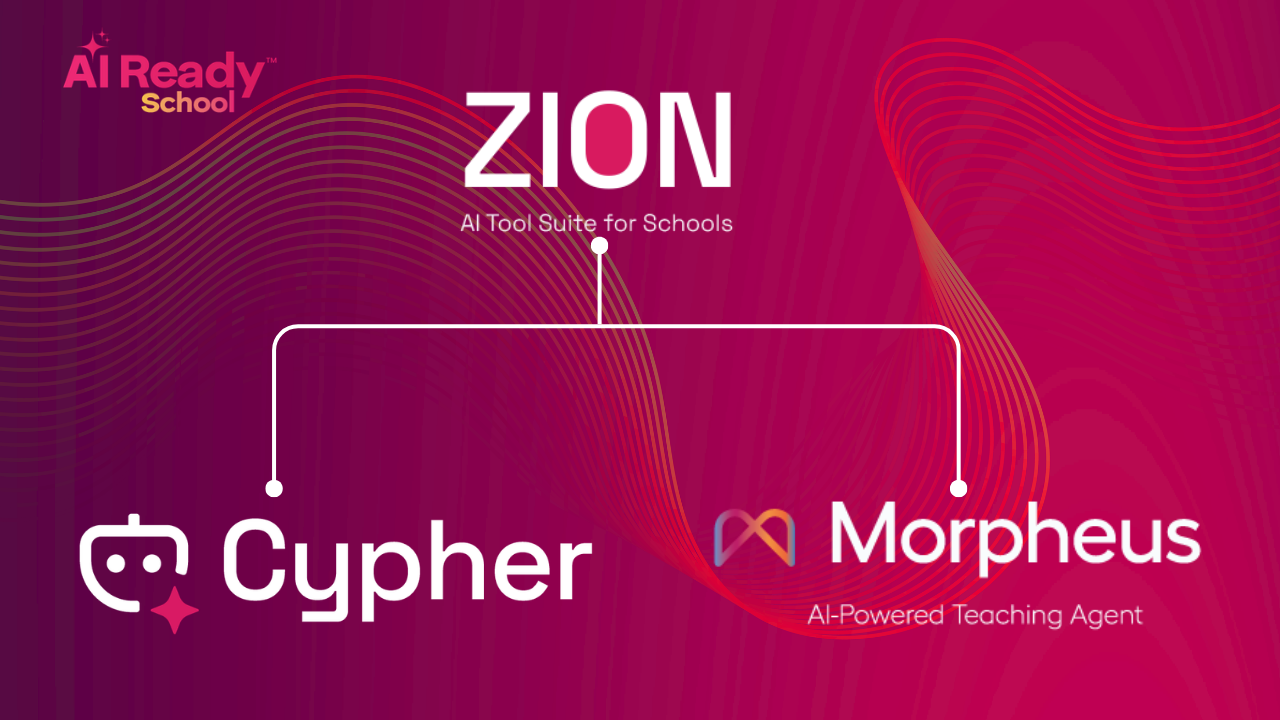
This is the capability that distinguishes Zion from any collection of tools a school might assemble on its own. Every student interaction across every hub generates signals that flow into the student's Cypher 360-degree profile and appear in the teacher's Morpheus monitoring dashboard in real time.
When a student spends 25 minutes in the Research Hub exploring the water cycle, Cypher knows about it before their next science session. When that student opens Cypher for their next learning conversation, Cypher does not introduce the water cycle as a new topic. It probes whether the student can connect what they explored independently to the conceptual framework their teacher introduced in class. When a student uses the Teachable Machine in the Project Hub to train an image recognition model, the Morpheus monitoring dashboard notes the activity and the depth of engagement. The teacher walks into the next class knowing this student has already had a hands-on experience with machine learning fundamentals and adjusts accordingly.
When a teacher creates a lesson in Morpheus that includes a creative output component, the assignment appears directly in the student's Creative Hub. The teacher assigned work. The student does the work. Completion and quality signals flow back to the dashboard. Mansi Sharma, TGT English Teacher at NH Goel World School, Raipur, described it this way: "I used to assign creative projects and have no idea what students actually did until they submitted. With Zion connected to Morpheus, I can see in real time who has started, what they have built, and where they are spending time. I can give feedback before the project is finished rather than after. That changes what feedback even means."
The connection between Zion and Cypher and Morpheus is what turns a tool suite into a learning intelligence system. The tools produce signals. The signals produce understanding. The understanding produces better teaching.
For innovation heads, Zion provides the structure that turns occasional student innovation into a repeatable, documented, school-wide pathway. Every school has students who want to build things. The question is whether the school gives them a pathway that develops real capability or simply a free period with an internet connection. The Project Hub's structured tools, combined with the NEO AI Innovation Lab curriculum, give innovation-orientated students a direct pathway from curiosity to prototype to competition-ready portfolio. The work they do is not extracurricular noise. It is documented, assessed, and connected to their permanent learning record.
For student council advisors, the Creative Hub transforms what student-led events, campaigns, and publications can look like. Students who can produce films using the Movie Generator, design campaigns using the Image Generator and Infinite Canvas, and publish content using the Presentation Creator and Story Generator are not just running better events. They are developing the creative and communication capabilities that define professional work. A student who has produced three school campaign films, two event presentations, and a story publication using Zion's Creative Hub has a portfolio that most adults working in communications would take seriously.
Zion gives innovation heads a platform, not just a promise. Every tool connects to a learning outcome. Every outcome is documented. Every portfolio entry is real.
We want to be direct about something. There are individual tools in the market that do specific things more powerfully than the equivalent tool in Zion. Some standalone image generators are more advanced. Some coding environments have more sophisticated features. If maximum raw capability in a single category is the only criterion, you can find more powerful tools.
But that is the wrong criterion for a school. The right criteria are the following: Is it safe for every student regardless of how they try to use it? Can every teacher see what every student is doing? Does it connect to the learning outcomes the school is accountable for? Can IT govern it without building a custom integration? Does using it build genuine AI literacy, or does it build AI dependency? Does the data it generates serve the school or leave the school?
Zion satisfies every one of these criteria. Not because it is the most powerful tool in every category. Because it is the only platform that integrates 30+ tools under a single K-12 safety architecture, connects every student activity signal to the teaching and learning ecosystem through Cypher and Morpheus, builds AI literacy at every level through the Learning Hub, Creative Hub, Research Hub, and Project Hub, and gives school management the visibility they need to make evidence-based decisions about AI in their institution.
Kinaisha Dubey, a Grade 6 student at NH Goel World School, Raipur, said: "This website made learning fun and engaging, helping me grasp the topics effortlessly." That is not a feature review. That is a student who felt capable. And a student who feels capable learns differently, engages differently, and develops differently than one who is simply using a tool. That difference is what Zion is built to produce.
The question is not which AI tools your school should subscribe to. It is how your school can give every student access to AI that is safe, governed, connected to their learning, and designed to build capability rather than replace it. That question has one answer.
Start Exploring Zion Today
AI Ready School provides a complete AI ecosystem for K-12 schools, including Zion (safe AI tool suite), Cypher (personalised learning companion), Morpheus (AI teaching agent), NEO (AI Innovation Labs), and Matrix (sovereign AI infrastructure).
To explore Zion's complete tool catalogue or discuss implementation at your school, reach out at hey@aireadyschool.com or call +91 9100013885.

.png)